JavaScript Data Types
Learn what kind of data JavaScript can store and how types behave in real code.
Primitive Types Reference Types Interview + MCQTable of Contents
What are Data Types in JavaScript?
Data type defines the kind of value a variable stores. Choosing the right type helps avoid bugs and improves readability. If you have not reviewed declarations yet, start with JavaScript Variables first.
let name = "Nikhil";      // string
let age = 25;            // number
let isActive = true;     // boolean
let score = null;        // null
let city;                // undefined
Primitive Types
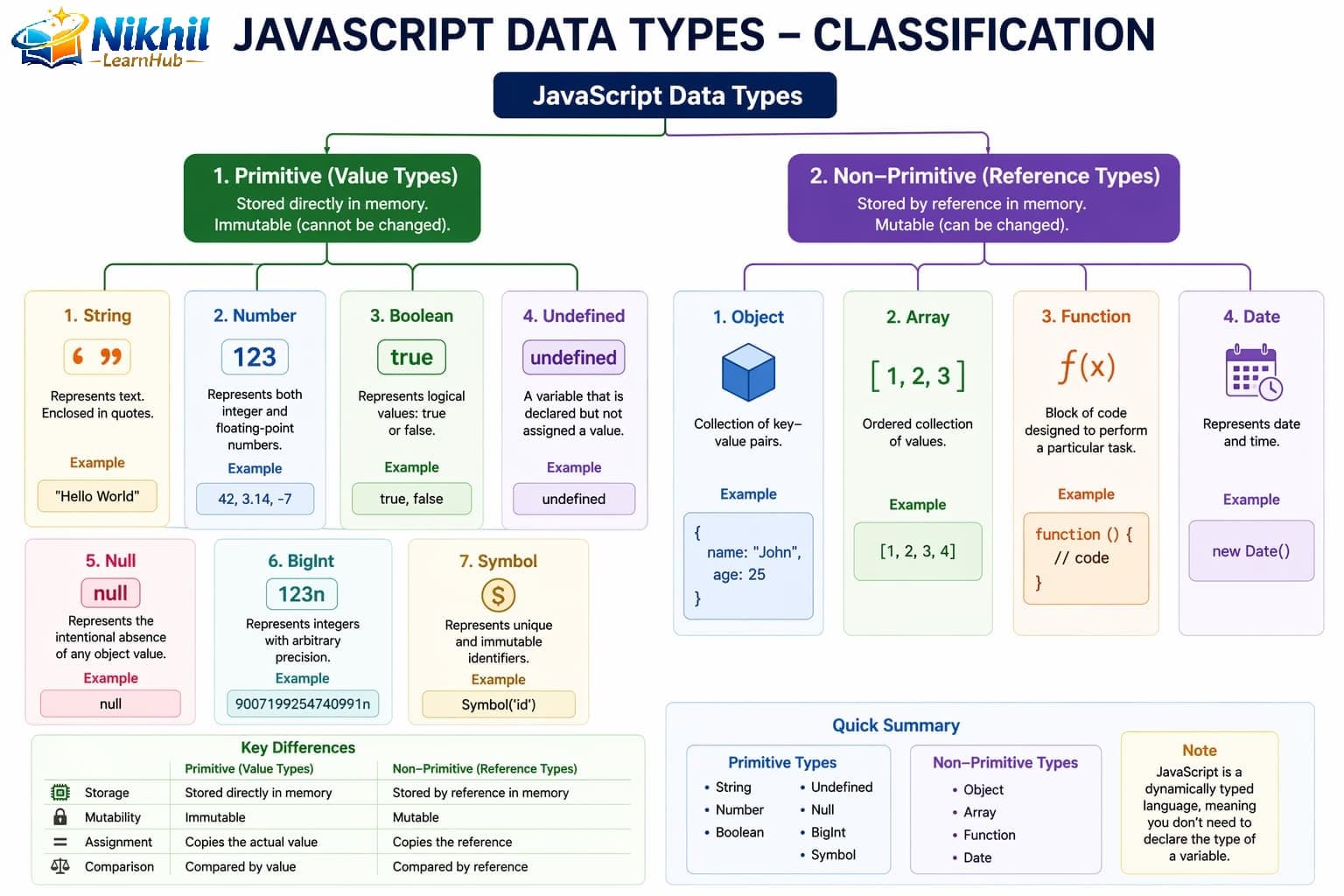
Primitive types are immutable and stored by value. JavaScript primitives are: string, number, bigint, boolean, undefined, null, and symbol.
| Type | Example | Use Case |
|---|---|---|
| string | "hello" | Text values, labels |
| number | 42, 3.14 | Math, counts, amounts |
| bigint | 9007199254740993n | Very large integers |
| boolean | true, false | Conditions, flags |
| undefined | let x; | Declared but not assigned |
| null | null | Intentional empty value |
| symbol | Symbol("id") | Unique property keys |
Symbol (ES6+)
Symbol creates unique, immutable identifiers. Even symbols with the same description are different values.
// Creating Symbols
let sym1 = Symbol();
let sym2 = Symbol("description");
let sym3 = Symbol("description");

console.log(sym2 === sym3);  // false (always unique!)
console.log(sym2.description);  // "description"

// Symbols as object keys (hidden from normal iteration)
let id = Symbol("id");
let user = {
    name: "John",
    [id]: 12345  // Symbol as key
};

console.log(user[id]);     // 12345
console.log(Object.keys(user));  // ["name"] (symbol not shown)
console.log(Object.getOwnPropertySymbols(user)); // [Symbol(id)]

// Well-known symbols
const myArray = [1, 2, 3];
const iterator = myArray[Symbol.iterator]();
console.log(iterator.next());  // { value: 1, done: false }

// Use cases: preventing property name collisions
const WATER = Symbol("water");
const COFFEE = Symbol("coffee");

let drink = {
    [WATER]: "H2O",
    [COFFEE]: "Caffeine"
};
Reference (Non-Primitive) Types
Objects, arrays, and functions are reference types. They are stored by reference, so changes through one variable can affect another linked variable.
Non-Primitive (Reference) Data Types
Non-primitives are mutable and stored by reference in memory.
| Data Type | Description | Mutability | Stored By |
|---|---|---|---|
| Object | Key-value pairs | Mutable | Reference |
| Array | Ordered list | Mutable | Reference |
| Function | Callable object | Mutable | Reference |
| Date | Date/time | Mutable | Reference |
| RegExp | Regular expression | Mutable | Reference |
| Map/Set | ES6 collections | Mutable | Reference |
const user = { name: "Asha" };
const copy = user;
copy.name = "Ravi";

console.log(user.name); // "Ravi"
// Both variables point to same object reference
This behavior is important when you later learn Objects and Arrays.
Primitive vs Reference: Key Differences
// PRIMITIVES - Stored by VALUE
let a = 10;
let b = a;      // b gets a COPY of the value
b = 20;
console.log(a); // 10 (unchanged)
console.log(b); // 20

// REFERENCE TYPES - Stored by REFERENCE
let obj1 = { value: 10 };
let obj2 = obj1;    // obj2 gets REFERENCE to same object
obj2.value = 20;
console.log(obj1.value); // 20 (changed!)
console.log(obj2.value); // 20

// Proving they reference the same object
console.log(obj1 === obj2);  // true (same reference)

// Creating a true copy (shallow)
let obj3 = { ...obj1 };      // Spread operator
let obj4 = Object.assign({}, obj1);
console.log(obj1 === obj3);  // false (different objects)

// Deep copy for nested objects
let nested = { a: { b: 1 } };
let deepCopy = JSON.parse(JSON.stringify(nested));
Visual Memory Representation
PRIMITIVE (by VALUE):
┌─────────────────────────────────────────┐
│ STACK Memory                            │
├────────────┬────────────────────────────┤
│ Variable   │ Value                      │
├────────────┼────────────────────────────┤
│ a          │ 10                         │
│ b          │ 20 (separate copy)         │
└────────────┴────────────────────────────┘

REFERENCE (by REFERENCE):
┌─────────────────────────────────────────┐
│ STACK           │ HEAP                  │
├────────────┬────┼───────────────────────┤
│ Variable   │ Ref│ Actual Object         │
├────────────┼────┼───────────────────────┤
│ obj1       │ 0x1│ 0x1: { value: 20 }    │
│ obj2       │ 0x1│ (same reference!)     │
└────────────┴────┴───────────────────────┘
Type Checking
Methods to Check Data Types
// 1. typeof operator (best for primitives)
console.log(typeof "hello");    // "string"
console.log(typeof 42);         // "number"
console.log(typeof true);       // "boolean"
console.log(typeof undefined);  // "undefined"
console.log(typeof Symbol());   // "symbol"
console.log(typeof 42n);        // "bigint"
console.log(typeof function(){}); // "function"
console.log(typeof {});         // "object"
console.log(typeof null);       // "object" (BUG in JS!)

// 2. instanceof (for objects)
console.log([] instanceof Array);        // true
console.log({} instanceof Object);       // true
console.log(new Date() instanceof Date); // true
console.log([] instanceof Object);       // true (arrays are objects)

// 3. Array.isArray() (best for arrays)
console.log(Array.isArray([]));          // true
console.log(Array.isArray({}));          // false

// 4. isNaN() vs Number.isNaN()
console.log(isNaN("hello"));   // true (coerces to NaN)
console.log(Number.isNaN("hello")); // false (no coercion)
console.log(Number.isNaN(NaN)); // true

// 5. constructor property
console.log((42).constructor.name);     // "Number"
console.log(("hi").constructor.name);   // "String"
console.log(([]).constructor.name);     // "Array"
console.log(({}).constructor.name);     // "Object"

// 6. Custom type checking function
function getType(value) {
    if (value === null) return "null";
    if (value === undefined) return "undefined";
    if (Array.isArray(value)) return "array";
    return typeof value;
}

console.log(getType(null));   // "null"
console.log(getType([]));     // "array"
console.log(getType({}));     // "object"
typeof, null vs undefined
console.log(typeof "hello");   // "string"
console.log(typeof 10);        // "number"
console.log(typeof true);      // "boolean"
console.log(typeof undefined); // "undefined"
console.log(typeof null); // "object" (historical JS behavior)- undefined: variable exists but no value assigned yet.
- null: intentional assignment to represent empty/no object.
Type Conversion (Explicit + Implicit)
JavaScript can convert values automatically (implicit coercion) or manually using conversion functions (explicit conversion).
// Explicit conversion
let n = Number("123");   // 123
let s = String(456);     // "456"
let b = Boolean(1);      // true

// Implicit conversion
console.log("5" + 2);    // "52"
console.log("5" - 2);    // 3
console.log(true + 1);   // 2
For clean logic and fewer bugs, prefer explicit conversion in most production code.
Common Pitfalls
// 1. Forgetting null is an object
let data = null;
if (typeof data === "object") {  // This will be true!
    // Runs incorrectly
}

// Better null check
if (data === null) { }

// 2. NaN is not equal to itself
console.log(NaN === NaN);  // false!
// Use isNaN() or Number.isNaN()
if (isNaN(value)) { }

// 3. Floating point precision
console.log(0.1 + 0.2 === 0.3);  // false
// Use tolerance or toFixed()
let tolerance = 0.000001;
console.log(Math.abs(0.1 + 0.2 - 0.3) < tolerance);  // true

// 4. Using == instead of ===
console.log(0 == false);   // true (coercion!)
console.log("" == false);  // true
console.log(0 === false);  // false (use ===)

// 5. Mutating objects unintentionally
let original = { name: "John" };
let copy = original;
copy.name = "Jane";
console.log(original.name);  // "Jane" (changed!)
// Create true copy
let safeCopy = { ...original };
Best Practices
- Use strict equality (
===) to avoid unintended type coercion. - Initialize variables with meaningful default values.
- Avoid mixing number and string operations unknowingly.
- Use
Array.isArray(value)to check arrays reliably. - Link your learning with Operators because type behavior heavily affects expressions.
10 JavaScript Data Types Interview Q&A
typeof null equal to "object"?medium2^53 - 1).Array.isArray(value).Number() and validate with Number.isNaN().10 JavaScript Data Types MCQs
Which is NOT a primitive type?
object is reference type, not primitive.Result of typeof null is:
"object".Which method reliably checks arrays?
Array.isArray() for array checks.Which represents intentionally empty value?
null is intentional absence of value."5" + 2 returns:
+ with string causes concatenation.Which type handles very large integers?
bigint stores large integers precisely.Value of uninitialized variable is:
undefined.Strict equality avoids:
=== compares value + type without coercion.Which conversion returns false?
0 is falsy, so Boolean(0) is false.What does Symbol() primarily provide?
Symbol creates unique values useful for object keys.