JavaScript Arrays
Store and process ordered collections efficiently.
array methodsiterationmap/filter/reduceTable of Contents
JavaScript Arrays Tutorial (Beginner -> Practical)
Arrays in JavaScript let you store multiple values in a single variable. They are ordered, indexed (starting from 0), and can hold different data types.
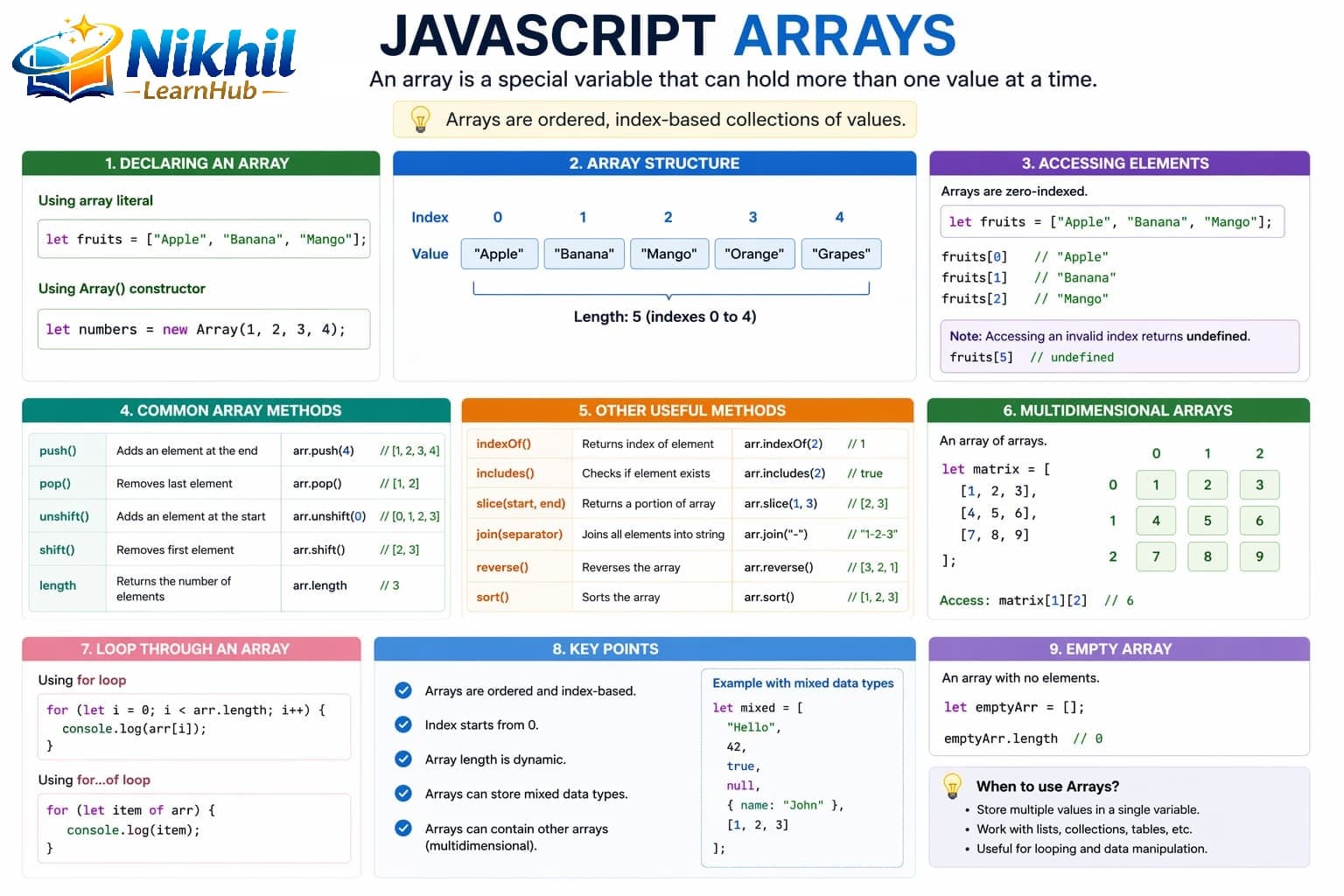
1. Creating an Array
let fruits = ["Apple", "Banana", "Mango"];
console.log(fruits);

// Empty array
let numbers = [];
2. Accessing Elements
Array elements are accessed using index.
let fruits = ["Apple", "Banana", "Mango"];

console.log(fruits[0]); // Apple
console.log(fruits[1]); // Banana
3. Modifying Elements
let fruits = ["Apple", "Banana", "Mango"];

fruits[1] = "Orange";
console.log(fruits);
4. Array Length
let fruits = ["Apple", "Banana", "Mango"];

console.log(fruits.length); // 3
5. Adding & Removing Elements
Add Elements
let fruits = ["Apple", "Banana"];

fruits.push("Mango");     // add at end
fruits.unshift("Grapes"); // add at beginning
Remove Elements
fruits.pop();    // remove last
fruits.shift();  // remove first
6. Looping Through Arrays
let fruits = ["Apple", "Banana", "Mango"];

for (let i = 0; i < fruits.length; i++) {
    console.log(fruits[i]);
}

// Modern loop
for (let fruit of fruits) {
    console.log(fruit);
}
7. Common Array Methods
let numbers = [1, 2, 3, 4];

// map -> transform
let doubled = numbers.map(n => n * 2);

// filter -> condition
let even = numbers.filter(n => n % 2 === 0);

// reduce -> single value
let sum = numbers.reduce((acc, n) => acc + n, 0);

console.log(doubled, even, sum);
8. Visual Understanding
Think of arrays as indexed boxes: index 0, 1, 2... Adding/removing from start or end changes positions. This mental model helps understand push/pop/shift/unshift quickly.
9. Multidimensional Arrays
Arrays inside arrays.
let matrix = [
    [1, 2, 3],
    [4, 5, 6]
];

console.log(matrix[1][2]); // 6
10. Real-Life Example
let cart = [100, 200, 300];
let total = 0;

for (let price of cart) {
    total += price;
}

console.log("Total Price:", total);
11. Important Tips
- Arrays can store mixed data types:
let data = [10, "Hello", true]; - Arrays are objects in JavaScript.
- Use
map,filter,reducefor cleaner modern code.
12. When to Use Arrays
Use arrays when you need to store lists like student names, product prices, marks/scores, or any collection of data.
Related Topics
Strengthen array skills with Loops, Functions, and Objects for practical data transformations.
10 Arrays Interview Q&A
1How is array index started?easy
Answer: Zero-based indexing.
2Difference between map and forEach?medium
Answer: map returns new array; forEach returns undefined.
3What does filter return?easy
Answer: New array of items passing condition.
4What is reduce used for?medium
Answer: Aggregate array into single value.
5How to clone array shallowly?easy
Answer: Spread syntax:
[...arr].6push vs unshift?easy
Answer: push adds end, unshift adds start.
7How to check array type reliably?easy
Answer: Use Array.isArray(value).
8Mutating vs non-mutating methods?hard
Answer: push/pop mutate original; map/filter return new arrays.
9find vs filter?medium
Answer: find returns first match; filter returns all matches.
10When use reduce over loop?medium
Answer: For concise accumulator transformations.
10 Arrays MCQs
1
First index of array is:
Explanation: arrays are zero-indexed.
2
push method:
Explanation: push appends item(s).
3
map returns:
Explanation: map creates transformed array.
4
filter returns:
Explanation: filter keeps matching values.
5
reduce result type is:
Explanation: reduce outputs accumulator.
6
Array type check:
Explanation: reliable array check API.
7
Method removing last element:
Explanation: pop removes and returns last item.
8
Spread clone array:
Explanation: spread creates shallow copy.
9
find returns:
Explanation: find returns first matched value.
10
Next topic after arrays here:
Explanation: sequence continues to objects.