JavaScript Operators
Use operators to perform calculations, comparisons, and decisions in JavaScript.
Arithmetic Comparison Logical & ModernTable of Contents
- Operators Intro
- Operator Categories
- Arithmetic Operators
- Assignment Operators
- Comparison Operators
- Logical Operators
- Bitwise Operators
- String Operators
- Conditional (Ternary)
- Comma Operator
- Unary Operators
- Relational Operators
- Operator Precedence
- Nullish Coalescing
- Optional Chaining
- Best Practices
- Interview Q&A
- Interview MCQ
What are Operators?
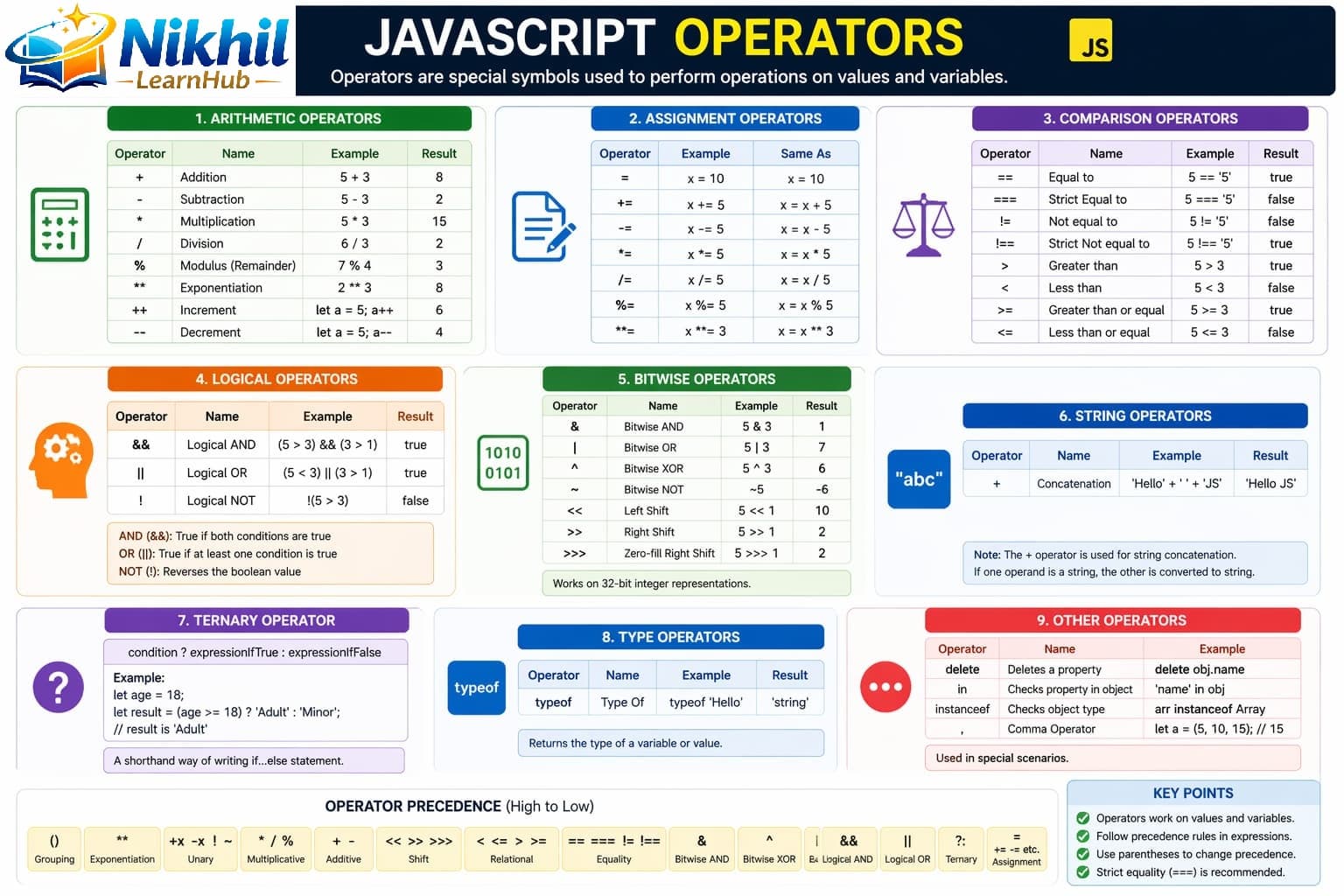
Operators are symbols that tell JavaScript to perform specific mathematical, logical, or comparison operations on values (operands).
// Basic structure: operand1 operator operand2
let result = 5 + 3;  // 5 and 3 are operands, + is operator
Operator Categories at a Glance
| Category | Purpose | Examples |
|---|---|---|
| Arithmetic | Math calculations | +, -, *, /, %, ** |
| Assignment | Assign values | =, +=, -=, *=, /= |
| Comparison | Compare values | ==, ===, !=, !==, >, < |
| Logical | Boolean logic | &&, ||, ! |
| Bitwise | Binary operations | &, |, ^, ~, <<, >> |
| Conditional | If-else shorthand | ? : |
| Unary | Single operand | ++, --, typeof, delete |
Arithmetic Operators
Used for mathematical calculations.
| Operator | Name | Example | Result |
|---|---|---|---|
+ | Addition | 5 + 2 | 7 |
- | Subtraction | 5 - 2 | 3 |
* | Multiplication | 5 * 2 | 10 |
/ | Division | 5 / 2 | 2.5 |
% | Modulus | 5 % 2 | 1 |
** | Exponentiation | 5 ** 2 | 25 |
// Basic Arithmetic
let a = 10;
let b = 3;
console.log(a + b);   // 13
console.log(a - b);   // 7
console.log(a * b);   // 30
console.log(a / b);   // 3.3333333333333335
console.log(a % b);   // 1
console.log(a ** b);  // 1000

// Increment / Decrement
let x = 5;
console.log(x++); // 5
console.log(x);   // 6
let y = 5;
console.log(++y); // 6
Assignment Operators
| Operator | Example | Equivalent To |
|---|---|---|
= | x = y | x = y |
+= | x += y | x = x + y |
-= | x -= y | x = x - y |
*= | x *= y | x = x * y |
/= | x /= y | x = x / y |
%= | x %= y | x = x % y |
**= | x **= y | x = x ** y |
&&= | x &&= y | x && (x = y) |
||= | x ||= y | x || (x = y) |
??= | x ??= y | x ?? (x = y) |
Comparison Operators
| Operator | Name | Example | Result |
|---|---|---|---|
== | Equal (loose) | 5 == "5" | true |
=== | Equal (strict) | 5 === "5" | false |
!= | Not equal (loose) | 5 != "5" | false |
!== | Not equal (strict) | 5 !== "5" | true |
> < >= <= | Relational | 5 > 3 | true |
// == does coercion
console.log(5 == "5"); // true
console.log(0 == false); // true

// === no coercion
console.log(5 === "5"); // false
console.log(0 === false); // false

// Objects compare by reference
console.log({} === {}); // false
const obj1 = { value: 10 };
const obj3 = obj1;
console.log(obj1 === obj3); // true
Logical Operators
| Operator | Name | Example | Short-circuit |
|---|---|---|---|
&& | AND | true && false | Stops at first falsy |
|| | OR | true || false | Stops at first truthy |
! | NOT | !true | Always evaluates |
console.log(!!"hello"); // true
console.log(!!0); // false
console.log("" || "default"); // "default"
console.log(true && 42); // 42
console.log(0 || 25); // 25
console.log(0 ?? 25); // 0
Bitwise Operators
Operate on binary representations (32-bit signed integers).
| Operator | Name | Example | Result |
|---|---|---|---|
& | AND | 5 & 3 | 1 |
| | OR | 5 | 3 | 7 |
^ | XOR | 5 ^ 3 | 6 |
~ | NOT | ~5 | -6 |
<< | Left shift | 5 << 1 | 10 |
>> | Right shift | 5 >> 1 | 2 |
String Operators
let firstName = "John";
let lastName = "Doe";
let fullName = firstName + " " + lastName;
let message = "Hello";
message += " World!";
console.log(fullName, message);
console.log("10" < "2"); // true (string comparison)
Conditional (Ternary) Operator
let age = 18;
let status = age >= 18 ? "Adult" : "Minor";

let score = 85;
let grade = score >= 90 ? "A"
          : score >= 80 ? "B"
          : score >= 70 ? "C"
          : "F";
Comma Operator
let a = (1, 2, 3);
console.log(a); // 3
for (let i = 0, j = 10; i < j; i++, j--) {
  console.log(i, j);
}
Unary Operators
| Operator | Name | Example |
|---|---|---|
+ | Unary plus | +"5" |
- | Unary negation | -5 |
typeof | Typeof | typeof x |
delete | Delete | delete obj.prop |
void | Void | void expr |
Relational Operators
let car = { brand: "Toyota", year: 2020 };
console.log("brand" in car); // true
console.log([] instanceof Array); // true
console.log({} instanceof Object); // true
Operator Precedence
Determines evaluation order. Use parentheses for clarity.
| Precedence | Type | Operators |
|---|---|---|
| 16 | Unary | ! + - typeof delete |
| 15 | Exponentiation | ** |
| 14 | Multiplicative | * / % |
| 13 | Additive | + - |
| 10 | Equality | == != === !== |
| 6/5 | Logical | && || |
| 4 | Conditional | ? : |
| 3 | Assignment | = += -= ... |
Nullish Coalescing Operator (??)
let value1 = 0;
console.log(value1 || 100);  // 100
console.log(value1 ?? 100);  // 0

let config = { timeout: 0, retryCount: null };
let timeout = config.timeout ?? 5000;  // 0
let retries = config.retryCount ?? 3;  // 3
Optional Chaining Operator (?.)
let user = { name: "John", address: { city: "New York" } };
let city = user?.address?.city;
let zipCode = user?.address?.zipCode; // undefined

let user2 = null;
console.log(user2?.name); // undefined

let city3 = user?.address?.city ?? "Unknown";
Best Practices for Operators
- Prefer
===and!==over loose equality operators. - Use parentheses in complex expressions for readability.
- Avoid deeply nested ternary chains; switch to
if/elsewhen needed. - Use
??when0,false, or empty string are valid values. - Use optional chaining to prevent unsafe nested property access errors.
10 JavaScript Operators Interview Q&A
1Difference between
== and ===?easyAnswer:
== coerces types before comparison; === compares value and type strictly.2What does
% operator do?easyAnswer: Returns remainder of division.
3When to use ternary operator?easy
Answer: For short conditional value selection; avoid over-nesting.
4Difference between
|| and ???mediumAnswer:
|| treats many falsy values as fallback triggers; ?? only checks null/undefined.5What is short-circuit evaluation?medium
Answer: Logical operators stop evaluating once result is determined.
6What does
instanceof check?mediumAnswer: Whether object exists in constructor prototype chain.
7Why avoid assignment in conditions?easy
Answer: It can cause accidental bugs and unclear intent.
8What is exponentiation operator?easy
Answer:
** raises left operand to power of right operand.9How does operator precedence affect expressions?medium
Answer: Higher-precedence operators execute first unless overridden by parentheses.
10Best comparison operator in modern JS?easy
Answer: Strict operators
=== and !==.10 JavaScript Operators MCQs
1
Which operator checks value and type both?
Explanation:
=== is strict equality (value + type).2Result of
Result of 10 % 3 is:
Explanation: Modulus gives remainder, so 10 % 3 is 1.
3
Which operator returns fallback only for null/undefined?
Explanation: Nullish coalescing (
??) checks only null/undefined.4
2 + 3 * 2 equals:
Explanation: Multiplication has higher precedence, so result is 8.
5
Which is exponentiation operator?
Explanation: JavaScript uses
** for power operation.6
Which expression uses ternary correctly?
Explanation: Ternary syntax is
condition ? value1 : value2.7
What does logical AND return first when left side is false?
Explanation:
&& short-circuits and returns first falsy operand.8
typeof 10 gives:
Explanation: JavaScript numeric values are type
number.9
Which operator negates a boolean value?
Explanation: Logical NOT operator
! flips truthiness.10
Which assignment adds value and stores back?
Explanation:
+= adds and assigns in one step.