How JavaScript Works
A simple breakdown of what happens when JavaScript code runs in a browser.
Engine Flow Execution Context Event LoopTable of Contents
Overview
When JavaScript runs, the browser loads your files, the JS engine parses the code into an internal representation, then executes it line by line inside an execution context. For asynchronous work, the event loop coordinates callbacks so the main thread keeps moving.
console.log("Hello, World!");// Press F12 -> Console to see this.
How JavaScript Works (Visual)
The diagram below summarizes the complete JavaScript execution lifecycle from writing code to output.
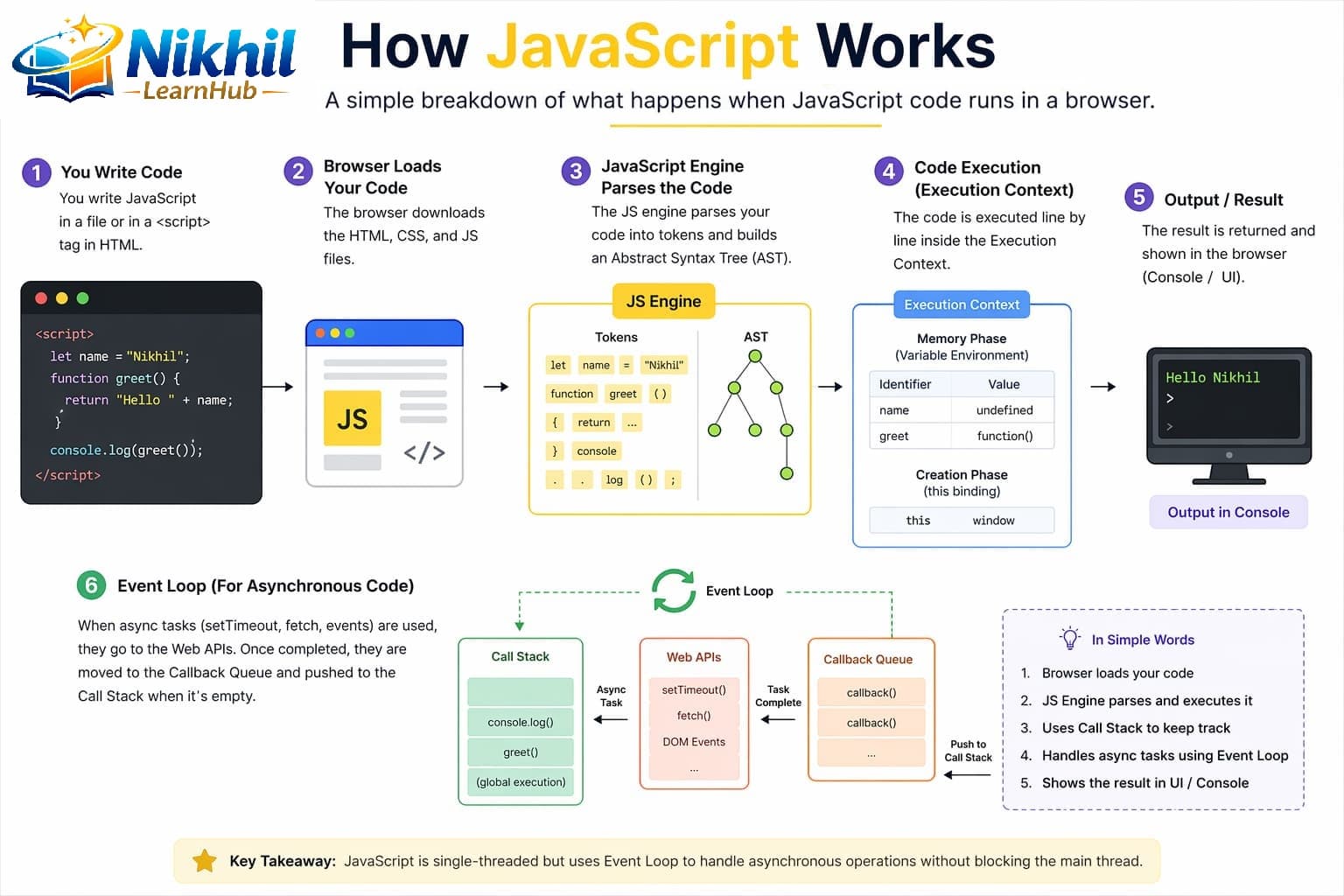
Execution Steps (Ordered)
- Write Code: JavaScript is written in external files or script tags.
- Browser Loads: Browser downloads HTML, CSS, and JS resources.
- Engine Parses: JavaScript engine tokenizes and parses code.
- Create Execution Context: Memory is allocated for variables/functions.
- Run Code: Statements execute line-by-line in call stack.
- Produce Output: Results appear in console or UI.
- Handle Async: Event loop schedules callbacks when stack is free.
Execution Context Explained
| Phase | What Happens | Example |
|---|---|---|
| Memory Creation | Variables are allocated, functions are stored. | var a -> undefined |
| Execution | Statements execute line by line. | a = 10, function calls run |
Every function call creates its own execution context and is pushed onto the call stack.
Event Loop and Async Behavior
JavaScript uses one main thread, so it cannot run two JS lines at the exact same time. To keep apps responsive, asynchronous operations are handled outside the call stack and coordinated by the event loop.
- Call Stack: Runs current synchronous JavaScript.
- Web APIs / Runtime APIs: Handle timers, network, DOM events.
- Task Queues: Completed async callbacks wait here.
- Event Loop: Moves a callback to stack when stack becomes empty.
console.log("Start");
setTimeout(() => console.log("Timer done"), 0);
console.log("End");
// Output: Start, End, Timer done
Why output is not Start, Timer done, End? Because setTimeout callback is queued and only executes after current synchronous stack is finished.
How to Run JavaScript on Windows, Linux, macOS
Windows
- Install Node.js from nodejs.org
- Create file:
app.js - Run in PowerShell:
node app.js
Linux
- Install Node.js (apt/dnf/pacman)
- Create file:
app.js - Run in terminal:
node app.js
macOS
- Install Node.js (official installer or Homebrew)
- Create file:
app.js - Run in terminal:
node app.js
10 JavaScript Engine Interview Q&A
then/catch/finally callbacks and queueMicrotask jobs.setTimeout, setInterval, DOM events, message channel tasks.